Side-by-side curriculum comparisons for the schools your student is actually weighing. What each program requires, where the grade gates sit, and which prereq traps decide whether a path is realistic. Built for the meeting where the family chooses.
Order a Comparison · $150 See a live example84 seconds: how a comparison reads, where each school's declaration gate sits, and what the flagged items mean.
One student's intended major, side by side across the schools they're weighing. A real comparison, not a mockup: Psychology at NYU and Rutgers, the two schools half of New Jersey is choosing between.
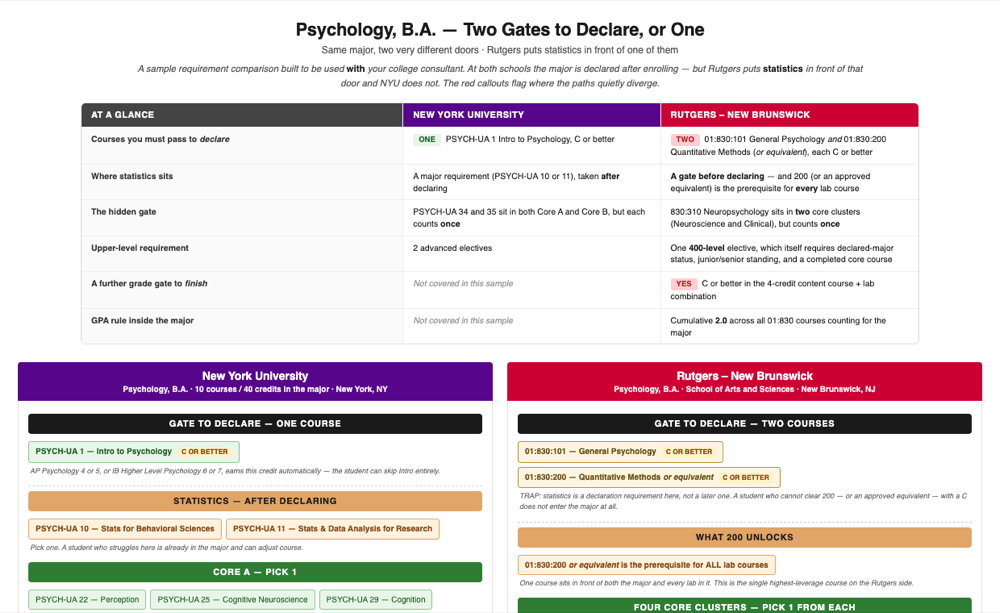
Psychology, B.A. · NYU (2025-26 Bulletins, College of Arts & Science) and Rutgers–New Brunswick (SAS Department of Psychology and SAS Academic Advising) · every claim independently verified before delivery.
Need one school in full? The single-school flowchart maps every required course, prereq chain, and elective path. Available as an add-on, priced per school.
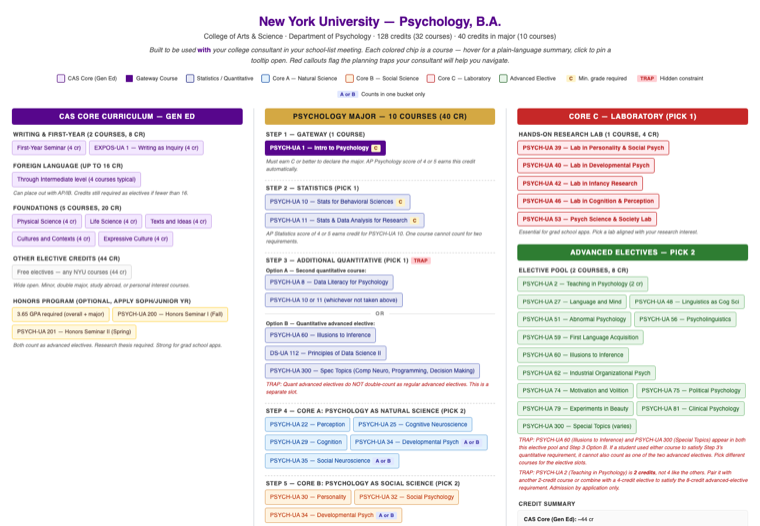
32 courses across Gen Ed, major core, laboratory, and advanced electives. Prereq chains drawn, grade gates flagged, plain-language summary on every course.
Open the full flowchart ↗Degree audit tools like Stellic and DegreeWorks show every prereq chain and course sequence, but only after a student enrolls. Prospective families can't see it.
Every school-list conversation, you're reading catalog PDFs, cross-referencing prereqs, and building the picture in your head. It works. It doesn't scale.
A parent asks “what does Psychology at NYU actually look like?” There's no visual way to answer that. Until now.
Place an order with your client's intended major and the 2 or 3 schools they're weighing. “Psychology at NYU, Rutgers, and Penn State.”
You get a side-by-side of what each program actually requires: the grade gates, the prereq chains, and the traps that decide whether a path is realistic. Every claim is checked against the official published requirements by independent reviewers before delivery.
Pull it up in the meeting. Walk the family through the grade gates and the prereq traps as they come up, and hover any flagged item for the plain-language explanation. You're the guide. The comparison is the map.
The IEC tool families remember from a discovery call isn't the CRM or the calendar. It's whatever showed them what their student would actually study, semester by semester, at the schools they're already comparing. That's the meeting where MapMyMajor earns its keep. Same flowchart works the rest of the year for ongoing client planning, but the close is the job it's built for.
They've interviewed three firms this week. You're the one who showed up having already mapped the curriculum at the schools they care about. Pull up the flowchart, click through the prereq traps live, answer the question their daughter actually has. That's the signal of depth that converts. Not another bio slide.
Once they've signed, the flowchart becomes your shared whiteboard. Compare two majors at the same school, surface the hidden prereq, decide which AP credits actually shorten the path. The family sees your preparation every time you open it.
IEC platforms like CollegePlannerPro and CounselMore manage your clients and track applications. College Kickstart tells you safety vs. reach. Naviance gives schools scattergrams.
None of them show a family what their student would actually study, semester by semester, at a target school. That's the gap.
Degree audit tools have this data, but they're locked behind institutional logins, available only after enrollment. MapMyMajor makes that data visible before a family commits.
You name the student's intended major and the schools they're weighing. We build the side-by-side comparison, verify it against the official catalogs with three independent checks, and deliver it within a week, under your name, so it goes to the family as your deliverable.
Need more depth on one school? The full single-school flowchart (every course, prereq chain, and elective path, like the NYU demo above) is available as an add-on, priced per school.
You see it before you pay for it.
Nothing is due upfront. Payment on receipt: the $150 is invoiced when your comparison is delivered. Every requirement traces back to the school's own published materials, and those sources are named on the comparison.
Send the student's intended major and their top 2 or 3 schools. The comparison comes back within a week, verified against the official catalogs and carrying your name, so your next family meeting starts with a visual answer, not a catalog PDF.
Questions first? Email nicole@mapmymajor.io directly.
Nothing due upfront. Payment on receipt: $150 invoiced when your comparison is delivered. Every requirement traces back to the school's own published materials.